BF-IDS-Project_Proposal
Project Proposal
Project Title: BF-IDS: Behavioral Fingerprinting-Augmented Embedded Intrusion Detection System with Real-Time Dashboard
Course: MICROPROCESSOR AND EMBEDDED SYSTEM
Program: BSc in CSE
Team: Sagar Biswas (The project is not finalized yet. If it remains that way, I will proceed with it as a solo project in future).
Supervisor: Md Sajid Hossain
Semester: 2025-2026, Spring
1. Executive Summary
This project proposes a low-cost, practical, and novel Behavioral Fingerprinting-Augmented Embedded Intrusion Detection System (BF-IDS) built on a Raspberry Pi 4 with optional ESP32 satellite nodes. The core idea is simple: instead of only relying on fixed rules or known attack signatures, the system also learns the normal behavior of every device on the network and raises an alert when something starts acting differently than usual.
Most existing IDS tools like Snort or Suricata work by matching traffic against a database of known attack patterns. That works fine for known attacks, but it completely misses new or zero-day attacks. Our system adds a behavioral fingerprinting layer on top — each device builds a profile of its own traffic habits over time, and any unexpected deviation from that profile triggers an alert, even if no matching signature exists.
On top of that, the system supports distributed monitoring through ESP32 nodes that connect back to the Raspberry Pi master over MQTT. This makes it possible to monitor multiple network segments at once using cheap hardware.
The system also captures network traffic in real time, sends alerts via Email and Telegram, automatically blocks malicious IPs using firewall rules, and shows everything through a web-based dashboard. The focus is on making a working, reproducible, and well-documented system that can be tested and evaluated properly.
2. Objectives
- Build a reliable packet capture pipeline on an embedded platform using C and libpcap.
- Detect common attacks such as port scans, ICMP floods, brute-force login attempts, and sudden traffic spikes using rule-based detection.
- Build a per-device behavioral fingerprint profile from live network traffic, tracking features like packet size distribution, protocol ratios, active/sleep cycles, and dominant destinations.
- Detect zero-day and stealthy attacks purely by spotting behavioral deviation from a device’s own normal profile — no pre-written signatures needed.
- Support distributed monitoring using ESP32 satellite nodes that send traffic data to the Raspberry Pi master over MQTT.
- Send real-time alerts via Email and Telegram when any anomaly or rule violation is detected.
- Automatically block malicious IPs using iptables with proper fail-safes to avoid false blocks.
- Provide a Flask-based live dashboard with per-device fingerprint visualization, event logs, and an admin control panel.
- Evaluate performance honestly — detection rate, false positive rate, latency, and resource usage — and document everything in a reproducible way.
3. System Overview
The entire system runs on a Raspberry Pi 4 as the central node. ESP32 boards act as optional satellite nodes that monitor remote network segments and forward data over MQTT.
The main modules are:
- Packet capture module written in C using libpcap — handles raw packet capture at low latency.
- Lock-free ring buffer — safely passes packets from the capture thread to Python worker processes without slowing down.
- Preprocessing worker — extracts flow features and per-device traffic statistics from raw packets.
- Behavioral Fingerprint Engine — builds and maintains a traffic behavior profile for every device seen on the network. Detects deviations in real time using Isolation Forest.
- Detection engine — combines rule-based detection, statistical anomaly detection (EWMA, z-score), and behavioral fingerprint deviation scoring.
- Response manager — blocks IPs via iptables, fires alerts, controls LED and buzzer over GPIO.
- SQLite database — stores event logs, device fingerprint profiles, and configuration.
- Flask dashboard with WebSocket updates — shows live traffic, per-device behavior, and admin controls.
- MQTT node manager — collects data from ESP32 satellite nodes and feeds it into the main pipeline.
Updated data flow:
[ESP32 Nodes] --MQTT--> [Node Manager]
                                |
[NIC] -> [libpcap capture] -> [Ring Buffer] -> [Preprocessor + Feature Extractor]
                                                          |
                                              +-----------+-----------+
                                              |           |           |
                                     [Rule Engine] [Anomaly Engine] [Fingerprint Engine]
                                              |           |           |
                                              +-----------+-----------+
                                                          |
                                              [Response Manager + Logger]
                                                          |
                                                    [Dashboard]
4. Detection Design
Rule-Based Detection
- Port scan: triggered when a single source IP probes too many unique destination ports within a sliding time window.
- ICMP flood: triggered when ICMP packets per second from a source goes above a configurable threshold.
- Brute-force login: detected by repeated failed HTTP POST login attempts from the same IP within a short window.
- Suspicious traffic spike: triggered when the packet rate deviates from the EWMA baseline by more than K standard deviations.
Statistical Anomaly Detection
- Entropy checks on packet payload distributions for common protocols.
- Per-IP z-score on packet size and packet rate to catch outlier behavior.
- Optional lightweight streaming model if time allows.
Behavioral Fingerprinting Engine (New — Core Novelty)
This is the main thing that makes BF-IDS different from a regular IDS.
Every device on the network has a “traffic personality” — its own normal habits. A smart bulb mostly just sends tiny status packets. A laptop has varied traffic but follows a certain rhythm. A security camera continuously streams data to specific destinations. These patterns are unique to each device.
The Behavioral Fingerprint Engine learns these patterns during a training window and then monitors for deviations in real time. The features tracked per device are:
- avg_packet_size          (normal size range for this device)
- packet_size_std          (how much size varies normally)
- protocol_ratio           (TCP : UDP : ICMP split)
- dominant_destinations    (which IPs/ports it usually talks to)
- inter_arrival_time       (how often it sends packets)
- bytes_per_hour           (hourly traffic baseline)
- sleep_wake_pattern       (when it is usually active or quiet)
- new_dest_rate            (how often it contacts new destinations)
An Isolation Forest model is trained on these features per device. When a device’s live stats score as anomalous against its own profile, the engine raises a behavioral alert. This catches things like:
- A smart plug suddenly starting port scanning (device compromise)
- A camera streaming to a new unknown destination (data exfiltration)
- A device suddenly changing from mostly TCP to mostly UDP traffic (tunneling)
- A device staying active at unusual hours when it is normally idle
The key advantage here is that none of this needs prior knowledge of the attack. It works even on encrypted traffic because we are looking at traffic metadata, not payload content.
False Positive Mitigation
- Whitelist known trusted hosts that should never be blocked.
- Require agreement from at least two independent detectors (for example, both rule engine and fingerprint engine) before auto-blocking.
- Behavioral alerts below a configurable confidence score are logged but do not trigger auto-block.
- Admin can manually override and unblock IPs from the dashboard.
- A device that shows unusual behavior during a known maintenance window can be temporarily put into observation-only mode.
5. Implementation Plan and Technologies
Packet Capture:
- C + libpcap for the hot path — this is the fastest way to grab packets on Linux
Core Processing:
- Python 3.11 with multiprocessing
- scikit-learn — Isolation Forest for behavioral fingerprint anomaly scoring
- numpy and pandas — feature vector management and statistical calculations
- joblib — saving and loading trained fingerprint models on the Raspberry Pi
Distributed Nodes:
- ESP32 firmware written in Arduino C++ with FreeRTOS
- MQTT protocol for ESP32 → Raspberry Pi communication
- Mosquitto broker running on the Raspberry Pi
Dashboard:
- Flask + Flask-SocketIO
- Chart.js — live traffic charts and per-device fingerprint visualization
Storage:
- SQLite — event logs, device fingerprint profiles, configuration
- Redis (optional) — ephemeral counters for high-speed rule checking
Testing Tools:
- nmap, hping3, tcpreplay — for simulating attacks
- Custom Python scripts for replaying pcap files
Deployment:
- systemd service for auto-start on boot
- Optional Dockerfile for easy reproducibility on other machines
6. Testing and Evaluation
Planned tests:
- Unit tests for each rule detector and the fingerprint deviation scorer
- Integration tests for the full pipeline from capture to response
- Behavioral fingerprint tests — train on benign traffic, then introduce attack traffic and measure detection
- Stress tests to measure packet loss, CPU, and memory under high load
- False positive tests using heavy benign traffic with no attacks
Key metrics:
- Detection rate and false positive rate — both for rule-based and behavioral detection
- Mean time from packet arrival to alert generation
- Mean time from alert to IP block
- CPU and RAM usage under normal and stressed conditions
- Packet loss rate in the capture pipeline
Target goals:
- Detection latency under 2 seconds
- False positive rate under 5% on benign benchmark traffic
- Packet loss below 1% at the target packet-per-second baseline
- Behavioral fingerprint detection rate above 80% for device compromise scenarios
7. Safety and Ethics
All testing will be done in a private, controlled lab network. No tests will be run on any network or device without explicit permission. Log data released publicly will be anonymized before sharing. The threat model document will explain what the system is and is not designed to defend against. Responsible testing procedures will be documented in the final report.
8. Deliverables
- Full source code with modular layout, unit tests, and integration tests
- Trained fingerprint models and training scripts for lab environment reproduction
- Dockerfile and systemd service script
- Architecture and sequence diagrams
- Test scripts, recorded pcap files, and traffic simulation scripts
- Performance and evaluation report with graphs
- 5–7 minute demo video and presentation slides
- Viva appendix with likely questions and answers
9. Timeline (8 Weeks)
- Week 1: Environment setup, capture module prototype in C, ring buffer implementation and test
- Week 2: Preprocessing worker and feature extractor; write test traffic simulation scripts
- Week 3: Implement core rule-based detection and unit tests; start passive fingerprint data collection from lab devices
- Week 4: Implement statistical anomaly detectors (EWMA, z-score); build behavioral profile builder and train initial Isolation Forest models
- Week 5: Response manager, iptables automation, GPIO alert integration; set up MQTT broker and ESP32 node firmware
- Week 6: Dashboard development with admin controls and per-device fingerprint visualization panels
- Week 7: Full stress testing, fingerprint model tuning, false positive rate benchmarking, threshold calibration
- Week 8: Documentation, demo recording, final report writing, presentation prep
10. Risk Analysis and Mitigation
- Packet loss under high load: mitigated by the C-based capture thread and lock-free ring buffer design; Python workers run separately and do not block the capture path
- Behavioral false positives during device updates or restarts: mitigated by putting devices into observation-only mode during known changes; configurable cool-down period before auto-blocking
- Fingerprint model drift over time: mitigated by a scheduled re-training window and manual re-train option from the dashboard
- False positives from rule-based detectors: mitigated by requiring correlation across two detectors before triggering auto-block
- SD card corruption or Pi crash: mitigated by read-only rootfs option, regular config backups, and a hardware watchdog on the ESP32 that can restart the Pi if needed
- ESP32 node going offline: the main system continues operating; offline nodes are logged and shown on the dashboard
11. Budget Estimate
- Raspberry Pi 4 (4 GB recommended): 10,000 – 15,000 BDT
- ESP32 Dev Board (for satellite node and/or GPIO controller): 800 – 1,500 BDT
- MicroSD card and accessories: ~1,000 BDT
No paid services are required. GeoLite2, Mosquitto MQTT broker, and all notification APIs used are free at the basic level.
Why ESP32?
- Built-in WiFi and Bluetooth make it easy to connect wirelessly to the main Pi
- Dual-core processor and FreeRTOS support allow running MQTT client and sensor tasks in parallel
- Multiple GPIO pins available for LED, buzzer, and other hardware alerts
- Very cheap and widely available in Bangladesh
- Can act as a hardware watchdog to restart the Pi if the main system hangs
- With MQTT, multiple ESP32 nodes can monitor different network segments and report to one central Pi
ESP32 Roles in This Project
- Satellite IDS node — monitors a separate network segment and sends traffic summaries to the Pi over MQTT
- Dedicated GPIO alert controller — handles LED and buzzer alerts independently from the Pi
- Hardware watchdog — restarts the Pi if a heartbeat signal is missed
- Optional future extension: add more ESP32 nodes to build a fully distributed IDS mesh
12. Repository Layout
bf-ids/
|
|-- README.md                        # Project overview and setup guide
|-- LICENSE                          # MIT License
|-- .gitignore
|-- requirements.txt                 # Python dependencies
|-- Makefile                         # Build automation for C capture module
|-- config.yaml                      # Default runtime configuration
|
|-- capture/                         # High-performance packet capture (C + libpcap)
|   |-- src/
|   |   |-- capture.c
|   |   |-- ring_buffer.c
|   |   |-- ring_buffer.h
|   |-- include/
|   |-- build/
|   |-- README.md
|
|-- core/                            # Core processing logic
|   |-- preprocessor/
|   |   |-- flow_builder.py
|   |   |-- packet_parser.py
|   |
|   |-- fingerprint/                 # Behavioral Fingerprinting Engine (NEW)
|   |   |-- profile_builder.py       # learns normal behavior per device
|   |   |-- deviation_scorer.py      # real-time anomaly scoring (Isolation Forest)
|   |   |-- feature_vectors.py       # feature extraction from flow data
|   |   |-- model_store/             # saved trained models per device MAC
|   |   |-- README.md
|   |
|   |-- detector/
|   |   |-- rules/
|   |   |   |-- port_scan.py
|   |   |   |-- icmp_flood.py
|   |   |   |-- brute_force.py
|   |   |
|   |   |-- anomaly/
|   |   |   |-- ewma.py
|   |   |   |-- zscore.py
|   |   |
|   |   |-- engine.py                # combines rule + anomaly + fingerprint scores
|   |
|   |-- database/
|       |-- models.py
|       |-- storage.py
|
|-- nodes/                           # Distributed ESP32 Satellite Nodes (NEW)
|   |-- esp32_satellite/             # ESP32 firmware
|   |   |-- main.cpp
|   |   |-- mqtt_client.cpp
|   |   |-- watchdog.cpp
|   |   |-- README.md
|   |-- mqtt_broker_config/          # Mosquitto broker config for RPi
|   |-- node_manager.py              # RPi side: collects and parses ESP32 data
|
|-- response/                        # Enforcement and alert handling
|   |-- firewall.py
|   |-- alert_service.py
|   |-- gpio_controller.py
|   |-- watchdog_interface.py
|
|-- dashboard/                       # Web UI
|   |-- app.py
|   |-- templates/
|   |-- static/
|   |-- websocket.py
|
|-- configs/
|   |-- development.yaml
|   |-- production.yaml
|
|-- tests/
|   |-- unit/
|   |-- integration/
|   |-- fingerprint/                 # Fingerprint training and eval scripts (NEW)
|   |   |-- train_profiles.py
|   |   |-- eval_detection.py
|   |-- traffic_simulation/
|   |   |-- nmap_scripts/
|   |   |-- hping_tests/
|   |   |-- replay_pcaps/
|   |-- sample_pcaps/
|
|-- scripts/
|   |-- setup.sh
|   |-- run.sh
|   |-- reset_firewall.sh
|   |-- train_fingerprints.sh        # shortcut to retrain all device profiles (NEW)
|
|-- docs/
|   |-- architecture.md
|   |-- sequence_flow.md
|   |-- fingerprint_design.md        # explains the behavioral fingerprinting approach (NEW)
|   |-- performance_report.md
|   |-- threat_model.md
|   |-- viva_notes.md
|
|-- docker/
|   |-- Dockerfile
|   |-- docker-compose.yml
|
|-- ci/
    |-- github-actions.yml
13. Architecture Diagram
Below is the architecture diagram for BF-IDS. It shows the Raspberry Pi as the central node, the ESP32 satellite nodes, all processing modules, and how they connect together.
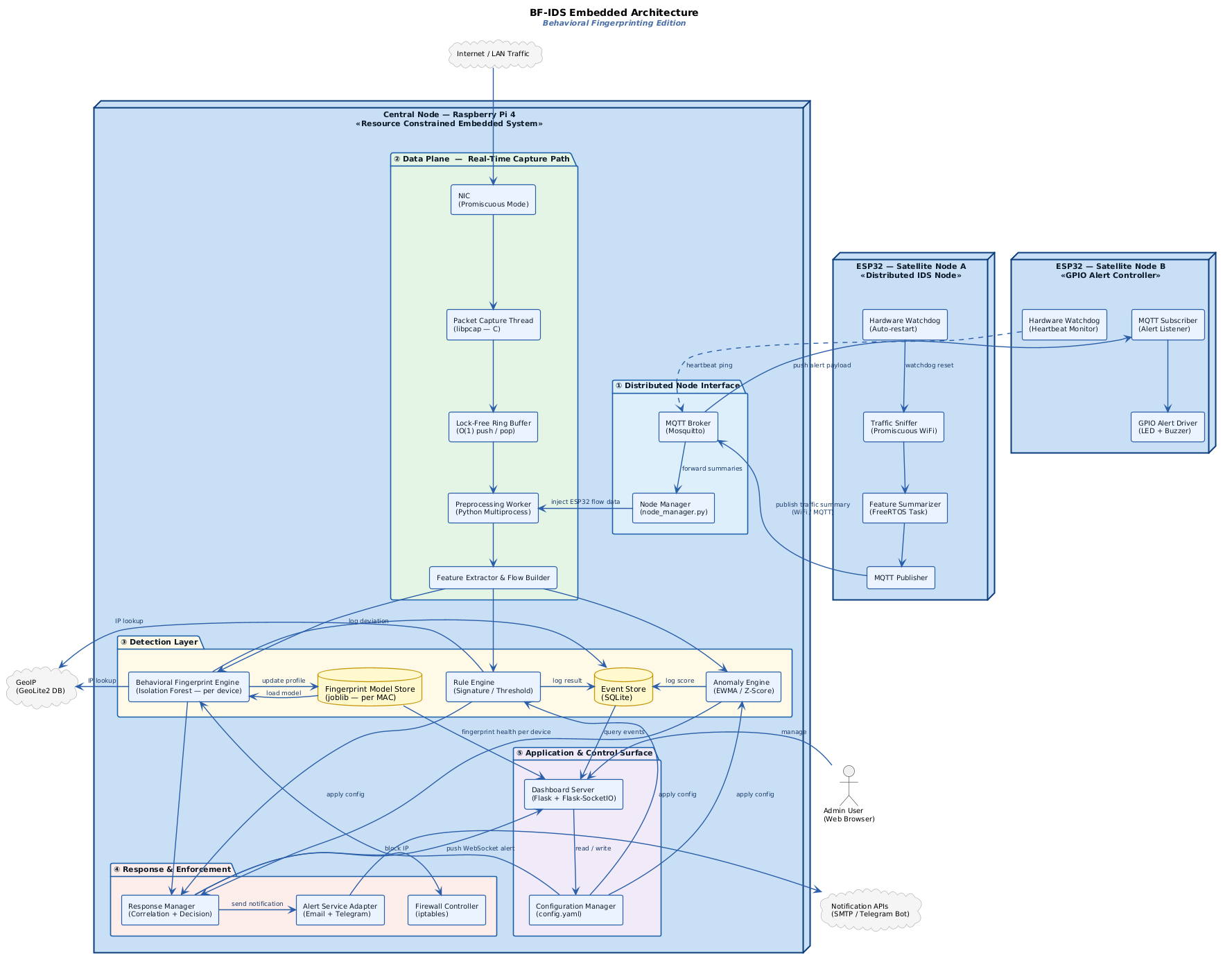
Diagram Summary
Think of the system like a security office that watches over a whole building with multiple checkpoints placed at different doors.
-
Checkpoints (ESP32 Satellite Nodes): Each ESP32 is placed at a different part of the network, like a guard at a separate door. Node A sniffs WiFi traffic in promiscuous mode, summarizes what it sees, and sends reports back to the main office over MQTT. Node B acts as a dedicated hardware alert controller — it listens for alert signals over MQTT and triggers an LED or buzzer when something is detected. Both nodes have a built-in hardware watchdog that can automatically restart themselves or ping the Pi to confirm the system is still alive.
-
Main office (Raspberry Pi 4): This is the central processing hub. All traffic — both from its own NIC and from ESP32 nodes via MQTT — arrives here and goes through the full detection pipeline.
-
Front desk (NIC + libpcap capture thread): The NIC runs in promiscuous mode, meaning it picks up all packets on the network, not just its own. The C-based capture thread grabs each packet the moment it arrives. It is written in C specifically because Python would be too slow for this part.
-
Conveyor belt (lock-free ring buffer): The captured packets are immediately pushed onto a ring buffer — a fast, shared memory structure that lets the C capture thread and the Python workers exchange data without stepping on each other. It is O(1), meaning it never slows down no matter how many packets come in.
-
Records clerk (preprocessor + feature extractor): A Python worker pulls packets off the buffer and extracts useful information — who sent it, where it was going, what protocol, how big it was, how often packets like this arrive. This becomes the input to all three detection engines.
- Three detection engines running in parallel:
- The Rule Engine checks for known bad patterns like port scanning, ICMP floods, and brute-force login attempts.
- The Anomaly Engine tracks statistical baselines using EWMA and z-score and flags sudden deviations.
- The Behavioral Fingerprint Engine is the new and core part of this system. It has learned what normal traffic looks like for every device on the network. If any device starts behaving differently — talking to new destinations, changing its protocol mix, waking up at odd hours — the engine notices and scores the deviation using an Isolation Forest model.
-
Storage: The Event Store (SQLite) logs all detection results and configuration. The Fingerprint Model Store holds the trained Isolation Forest model for each device, saved and loaded by MAC address.
-
Incident response team (Response Manager): When the detection engines raise an alert with enough confidence, the response manager steps in. It tells the firewall to block the attacker IP using iptables, sends an alert message via Email or Telegram, and pushes a real-time notification to the dashboard over WebSocket.
-
Control room (Dashboard + Configuration Manager): The admin sees everything live — per-device fingerprint health, active events, blocked IPs, and system resource usage. Thresholds, whitelists, and fingerprint sensitivity can all be changed from the dashboard without restarting anything.
- External services like GeoIP (GeoLite2) and notification APIs (SMTP, Telegram Bot) are intentionally kept outside the Raspberry Pi boundary. They are only called when needed and are never in the critical detection path.
14. Sequence Diagram
Part 1 — Real-Time Packet Processing and Detection
This diagram shows what happens from the moment a packet arrives on the network until a detection decision is made.
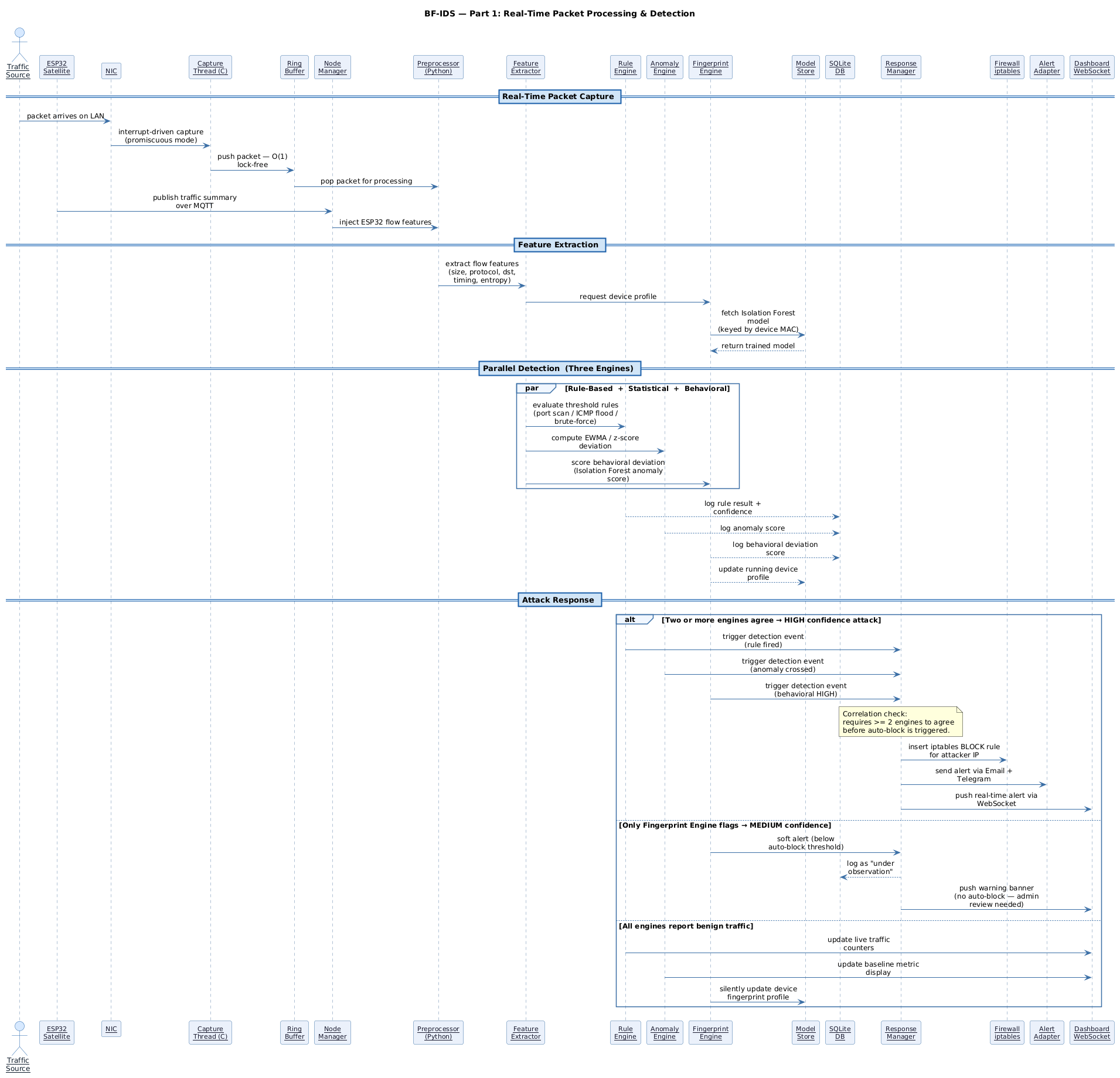
Diagram Summary
-
Packet capture: A packet arrives at the NIC. The libpcap capture thread grabs it immediately using an interrupt-driven approach. The packet is pushed into the ring buffer in O(1) time, then picked up by the Python preprocessor. If an ESP32 satellite node also detected something, the Node Manager injects that data into the same preprocessing pipeline.
-
Feature extraction: The preprocessor sends the packet data to the Feature Extractor, which builds a feature snapshot for that device — size, protocol, destination, timing, entropy. The Feature Extractor also asks the Fingerprint Engine to load the trained Isolation Forest model for that device from the Model Store.
- Three engines run in parallel:
- The Rule Engine checks for known attack patterns.
- The Anomaly Engine computes EWMA and z-score deviation from baseline.
- The Fingerprint Engine scores how much the current traffic deviates from the device’s normal behavioral profile.
- All three log their results to SQLite. The Fingerprint Engine also updates the running device profile in the Model Store.
- Three possible outcomes:
- If two or more engines agree there is an attack, the Response Manager is triggered with high confidence. It blocks the IP in iptables, sends an alert via Email and Telegram, and pushes a real-time alert to the dashboard.
- If only the Fingerprint Engine flags something, it is treated as a medium-confidence behavioral anomaly. A warning is logged and shown on the dashboard, but no auto-block happens — the admin needs to review it first.
- If all engines report normal traffic, the dashboard counters are updated silently and the device profile is refreshed.
Part 2 — Admin Control, Fingerprint Training and Node Health
This diagram covers the management side of the system — what the admin can do, how fingerprint models are trained, and how ESP32 nodes are monitored.
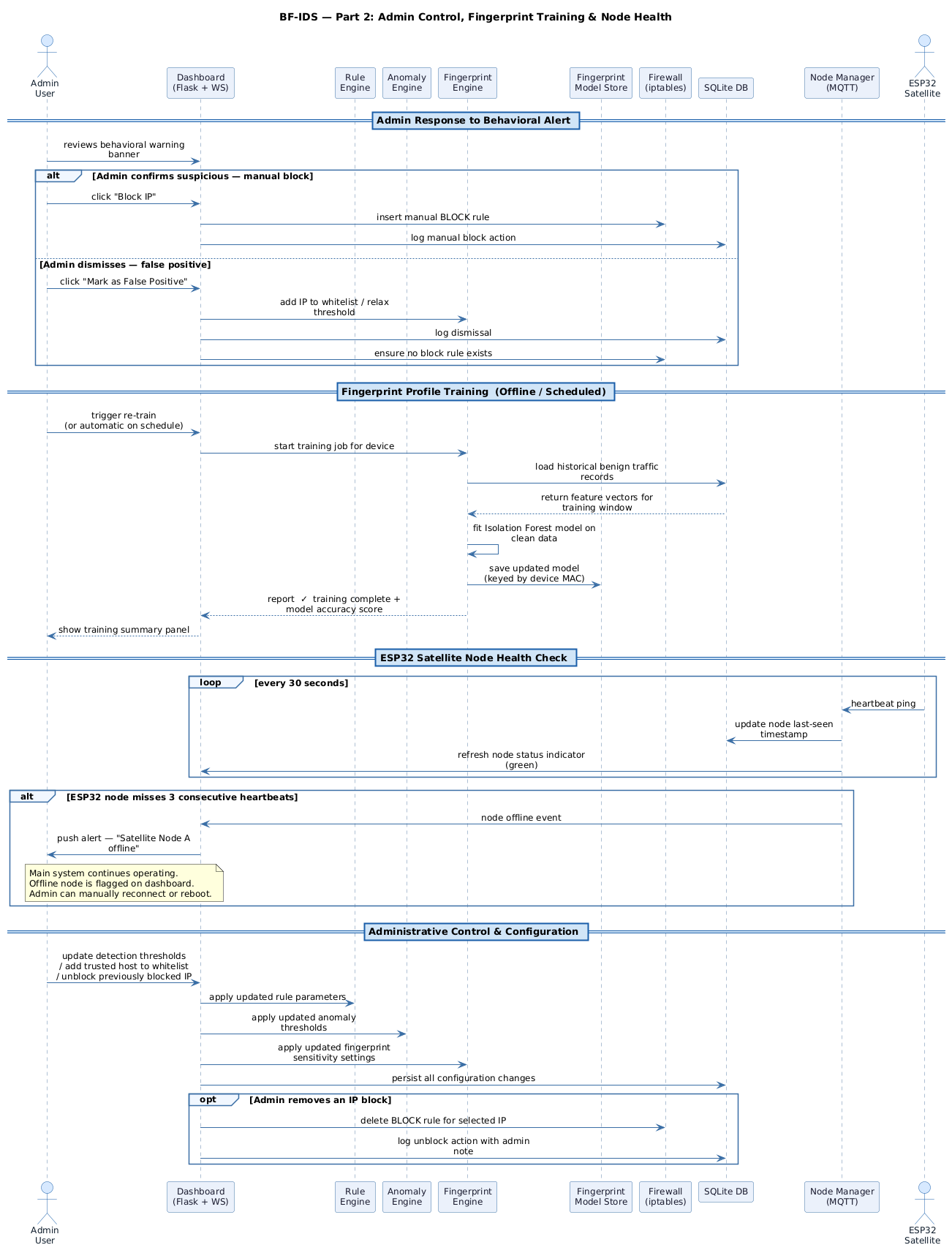
Diagram Summary
-
Admin response to a medium alert: When the dashboard shows a behavioral warning, the admin can either confirm it as suspicious (which triggers a manual IP block in iptables and logs the action) or dismiss it as a false positive (which adds the device to the whitelist and relaxes the fingerprint threshold for that device).
-
Fingerprint profile training: Training can be triggered manually by the admin or run automatically on a schedule. When triggered, the Fingerprint Engine pulls historical benign traffic records for the target device from SQLite, fits a new Isolation Forest model on those feature vectors, and saves the updated model to the Fingerprint Model Store keyed by the device’s MAC address. A training summary with model accuracy is shown on the dashboard.
-
ESP32 satellite node health check: Every 30 seconds, each ESP32 node sends a heartbeat ping to the Node Manager. The Node Manager updates the node’s last-seen timestamp in SQLite and refreshes the status indicator on the dashboard. If a node misses three consecutive heartbeats, the Node Manager pushes a node-offline event to the dashboard, which then notifies the admin. The main detection system continues running normally — losing a satellite node does not stop anything.
-
Admin configuration changes: From the dashboard the admin can update detection thresholds, add trusted hosts to the whitelist, or unblock a previously blocked IP. All changes are pushed live to the Rule Engine, Anomaly Engine, and Fingerprint Engine without restarting the system. Everything is persisted to SQLite so the settings survive a reboot.
15. Fingerprint Engine — Internal Design
This diagram shows how the Behavioral Fingerprint Engine processes each device’s traffic internally, including the learning phase for new devices and the deviation scoring phase for known devices.
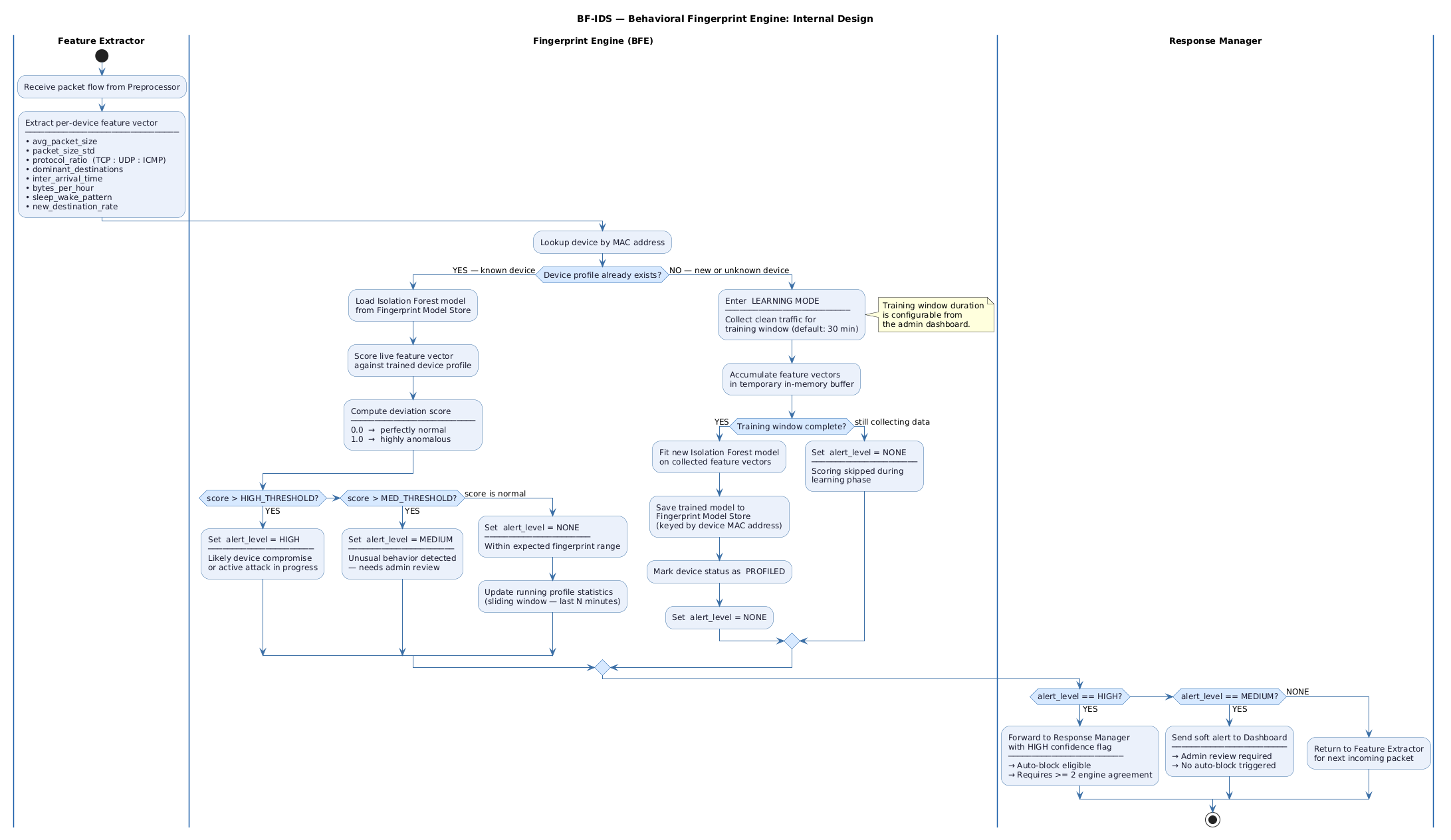
Diagram Summary
The Fingerprint Engine works in two completely different modes depending on whether it has seen a device before.
-
Feature Extractor lane: Every packet that passes through the preprocessor produces a feature vector for its source device. This vector includes eight features: average packet size, packet size standard deviation, protocol ratio (TCP vs UDP vs ICMP), dominant destinations, inter-arrival time, bytes per hour, sleep/wake pattern, and new destination rate. This vector is handed off to the Fingerprint Engine.
- For a known device (profile already exists):
- The engine loads the trained Isolation Forest model from the Model Store using the device’s MAC address as the key.
- It scores the live feature vector against the trained profile.
- The deviation score ranges from 0.0 (perfectly normal) to 1.0 (highly anomalous).
- If the score is above the HIGH threshold, the alert level is set to HIGH — this likely means the device is compromised or under active attack.
- If the score is above the MEDIUM threshold but below HIGH, the alert level is set to MEDIUM — the behavior is unusual and needs a human to review it.
- If the score is normal, the alert level stays NONE and the running profile statistics are updated using a sliding window so the model stays fresh.
- For a new or unknown device (no profile yet):
- The engine enters Learning Mode and starts collecting clean traffic for the device.
- The default training window is 30 minutes, but this can be changed from the admin dashboard.
- During the training window, all feature vectors are accumulated in a temporary in-memory buffer. No scoring happens during this phase, so no false alerts are raised for new devices.
- Once the training window is complete, a new Isolation Forest model is fitted on the collected feature vectors, saved to the Model Store, and the device is marked as PROFILED.
- From that point on, the device is treated as a known device and deviation scoring begins.
- Response Manager lane:
- If alert_level is HIGH, the result is forwarded to the Response Manager with a high confidence flag. Auto-blocking is eligible, but still requires at least two engines to agree before it actually happens.
- If alert_level is MEDIUM, a soft alert is sent directly to the Dashboard. The admin is notified and can review it, but nothing is blocked automatically.
- If alert_level is NONE, the engine simply returns control back to the Feature Extractor so it can process the next incoming packet.
16. Limitations and Future Work
Current Limitations
- Tested in a controlled lab environment only — real-world internet traffic is much noisier and would need more careful threshold tuning.
- The behavioral fingerprint models need a clean training period with only normal traffic. If attack traffic is mixed into the training window, the profiles will be wrong.
- Isolation Forest works well but is not the most powerful anomaly detection algorithm. It was chosen because it runs on a Raspberry Pi without killing performance.
- Raspberry Pi 4 is still resource-limited. Very high traffic rates (above a few hundred Mbps) will likely cause packet loss.
- ESP32 nodes are passive reporters right now — they do not make blocking decisions themselves. All enforcement is centralized on the Pi.
Future Work
- Replace Isolation Forest with a more powerful streaming model like RRCF (Robust Random Cut Forest) which is specifically designed for time-series anomaly detection.
- Add DNS tunneling and TLS fingerprinting detection as new rule modules.
- Build a proper distributed enforcement mode where ESP32 nodes can block traffic locally using their own GPIO-connected relay modules.
- Add attack heatmaps and longer trend history to the dashboard.
- Test the system against real-world benchmark datasets like UNSW-NB15 or CIC-IoT-2023 to get proper academic evaluation numbers.
- Explore running a tiny quantized ML model directly on the ESP32 for on-device behavioral scoring without needing to report back to the Pi.
17. Quick Q/A (Important Terms)
ICMP Flood
- What: An attack that sends a massive number of ICMP ping packets to overwhelm a target.
- Why relevant: One of the most common and easy-to-launch DoS attacks. Easy to simulate in a lab and easy to detect with a simple packets-per-second rule.
Traffic Spike
- What: A sudden sharp increase in traffic volume over a short time.
- Why relevant: Can be normal (a software update started) or malicious (a DDoS attack starting). Context is important — this is exactly the kind of thing EWMA helps distinguish.
libpcap
- What: A C library that lets programs capture raw network packets directly from a network interface at the kernel level.
- Why relevant: It is the standard tool for packet capture on Linux. We use it in the capture module because it is much faster than Python-based alternatives.
Lock-Free Ring Buffer
- What: A circular memory buffer where producers and consumers can operate without using locks or mutexes.
- Why relevant: Locks slow everything down when there is high-speed packet capture happening. A lock-free design lets the capture thread and the Python workers run at full speed without blocking each other.
Behavioral Fingerprinting
- What: The process of building a unique traffic profile for a device based on how it normally behaves on the network — what protocols it uses, where it talks, how much data it sends, when it is active.
- Why relevant: This is the core novelty of BF-IDS. It allows detection of compromised or misbehaving devices without needing to know what the attack looks like in advance.
Isolation Forest
- What: A machine learning algorithm designed specifically for anomaly detection. It works by randomly partitioning the data and checking how easy it is to isolate a specific data point — anomalies get isolated quickly.
- Why relevant: It is lightweight, works well with small training sets, and runs fast enough on a Raspberry Pi. Perfect for scoring behavioral deviation in real time.
MQTT
- What: A lightweight publish-subscribe messaging protocol designed for constrained devices and low-bandwidth networks.
- Why relevant: ESP32 satellite nodes publish their traffic summaries to MQTT topics. The Raspberry Pi subscribes and processes them. It is the glue between the distributed nodes and the central system.
EWMA
- What: Exponential Weighted Moving Average — a running average that gives more weight to recent values and less to older ones.
- Why relevant: Helps track a “normal” baseline for packet rate per device. If the current rate shoots up far above the EWMA baseline, it is flagged as suspicious.
z-score
- What: A number that says how many standard deviations a value is from the mean.
- Why relevant: Used to detect statistically unusual behavior, like a device suddenly sending packets that are much larger or smaller than usual.
GPIO Pins
- What: General Purpose Input/Output pins on the Raspberry Pi or ESP32 that can be programmed to either read a signal or output a signal.
- Why relevant: Used to control physical hardware like an LED or buzzer that provides a visible and audible alert when an attack is detected.
UART
- What: A serial communication method using two wires — TX (transmit) and RX (receive) — for sending data between two devices.
- Why relevant: Can be used to connect Raspberry Pi and ESP32 as a simple and reliable communication link for sending alert signals.
I2C
- What: A two-wire communication protocol (SDA for data, SCL for clock) that supports multiple devices on the same bus.
- Why relevant: Reduces wiring complexity when multiple sensors or modules need to connect to the Pi at the same time.
Distributed IDS Node
- What: A separate device that independently monitors its own network segment and reports findings to a central system.
- Why relevant: Makes the system more scalable and resilient. If one node fails, the others keep working. In this project, ESP32 boards serve as the distributed nodes.
NIC (Network Interface Card)
- What: The hardware component that physically connects a device to a network.
- Why relevant: The NIC is where all packets first arrive. libpcap captures packets directly from here.
18. Project Development Note
This project started as a basic embedded IDS proposal for an academic course submission. After reviewing existing tools and current trends in IoT security, it became clear that rule-based detection alone is not enough — most real-world IoT compromises involve behavior changes that no existing signature would catch. That realization led to the addition of the behavioral fingerprinting layer, which is now the core differentiator of this project.
The proposal has gone through multiple revisions. The current README represents the second major version — upgraded with behavioral fingerprinting, distributed ESP32 node support, and a more honest evaluation plan compared to the original draft.